
More than a third of all traffic on the internet right now isn’t human. Bad bots account for 37% of all internet traffic, and for the first time in a decade, automated traffic overall has surpassed human activity, making up 51% of all web traffic in 2024, according to the Imperva 2025 Bad Bot Report.
Some of that automated traffic inevitably reaches pages displaying ads. To protect advertiser trust and the quality of the clicks it charges for, Google uses automated systems to evaluate click quality and respond when it detects patterns consistent with invalid or otherwise low-quality traffic. Understanding those responses—and what they can cost at each stage—can help publishers identify problems before they have a measurable impact on revenue.
How Google May Respond to Click Quality Issues
When Google’s systems detect suspected invalid click activity, they can respond in several ways depending on the type, severity, and persistence of the issue. These responses are automated, and the earlier the underlying problem is addressed, the less likely it is to have a lasting impact.
| Response | What Happens | Immediate Effect |
|---|---|---|
| Confirmed Click applied | Google adds an extra confirmation step before users reach advertisers on ads served through Google demand. | CTR often declines because some users abandon the additional step. |
| Revenue adjustment | Google identifies interactions it determines were invalid and credits advertisers accordingly. | Previously reported earnings may be adjusted. |
| Account enforcement | In severe or persistent cases, Google may suspend or disable an AdSense or Ad Manager account. | Primary monetization through Google may be affected. |
While these outcomes aren’t necessarily sequential, they all stem from the same underlying issue: invalid click activity reaching your ad inventory. Google’s systems respond to the click-quality signals they observe, so reducing invalid activity before it reaches your ads is the most effective long-term strategy.
Response 1: Confirmed Click Applied
When Google’s systems determine that a meaningful share of clicks reaching your ad units may not be genuine, they can insert an additional confirmation step before sending users to the advertiser’s landing page. Users must complete that extra step before the click is counted as intentional. Because some users don’t continue, affected inventory often experiences noticeable CTR declines.
Three things are useful to know about Confirmed Click:
- It applies only to Google demand (such as AdSense and Ad Exchange), not necessarily your entire monetization stack.
- It’s fully automated. There’s no manual review or appeal process; Google removes it only after its systems determine click quality has improved.
- Google now exposes Confirmed Click status in reporting at the site and ad-unit level, but many publishers still haven’t checked whether it’s been applied.
Response 2: Revenue Adjustment
If invalid click activity continues, Google may later determine that some interactions weren’t genuine and credit those amounts back to advertisers. Because this review can occur after earnings have already been reported, previously recorded revenue may be adjusted retroactively.
Response 3: Account Enforcement
In severe or persistent cases involving invalid traffic or policy violations, Google may suspend or disable an AdSense or Google Ad Manager account. For many publishers, Google represents their primary source of ad demand, making this the most significant potential consequence of unresolved click-quality issues.
The Number That Should Change How You Prioritize This
In a review of eight websites inside a single publisher’s Google account, MonetizeMore found that after Confirmed Click was applied—and the underlying causes were not successfully addressed—average revenue fell by 95% within about one month.
This is first-party data from one publisher’s account across eight websites, not an industry-wide study. It should be treated as a directional case study rather than a universal outcome. Even so, it provides concrete evidence in an area where public data is limited and aligns with what many publishers observe: introducing friction at the click stage can reduce revenue, and unresolved click-quality issues may compound that impact over time.
Reading Your Own Risk: The Threat Level Framework
Traffic Cop summarizes click-quality risk as a single metric:
Threat Level = Measured Spam Clicks ÷ Total Ad Clicks
Only spam clicks that actually reach your inventory count toward the score. Clicks blocked before reaching your ads don’t.
| Threat Level | Range | What It Means |
| Normal | Under 5% | Baseline background noise |
| Elevated | 5–10% | Worth monitoring |
| High Risk | Over 10% | Indicates meaningful click-quality issues that may increase the likelihood of Google applying additional protections if left unresolved |
Example Report
(Illustrative example only—not based on a live customer account.)
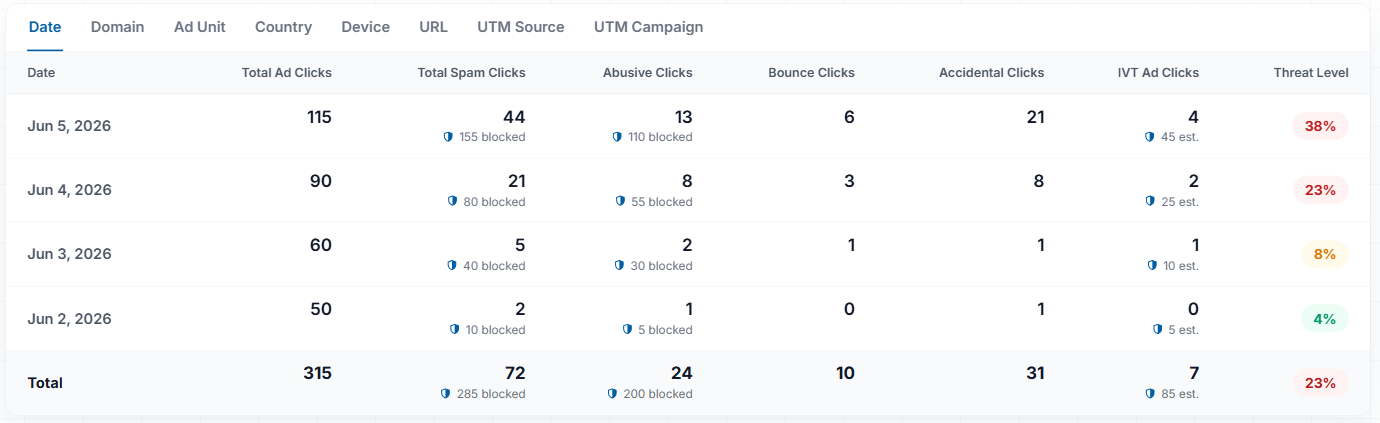
Notice what this view catches that an earnings report never would. The threat level climbs steadily over four days—from a normal 4%, to an elevated 8%, then into high-risk territory at 23% and 38%. Watching that trend develop gives publishers an opportunity to investigate while the problem is still manageable, well before it may show up as declining revenue.
Breaking the same data down by spam type also provides clues about the underlying cause. In this example, accidental clicks account for 31 of the 72 measured spam clicks and nearly half of the highest-risk day’s total. That pattern may point to an ad placement issue—such as a sticky mobile unit or layout that encourages unintended clicks—rather than poor traffic quality. If abusive or IVT clicks were leading instead, the investigation would likely focus elsewhere. Seeing those patterns early makes it easier to choose the right corrective action.
The 60-Second Self-Audit
If you use AdSense, check:
Reports → Breakdowns → Confirmed Click Status (if available in your account).
Any site showing Applied indicates that Google has added the extra confirmation step to that inventory.
If you use Google Ad Manager or MCM, check your available Policy Center and reporting for Confirmed Click status. If you don’t have direct visibility because your inventory is managed by a monetization partner, ask them whether Confirmed Click has been applied to your account.
Checking takes about a minute and can help you identify click-quality issues before they become significantly more expensive to address.
If you’d like a second opinion without committing to anything, MonetizeMore’s Traffic Cop team offers a free Ad Click Spam Risk Snapshot. Submit a single domain and receive an assessment of your site’s click-quality risk before deciding on your next steps.
source https://www.monetizemore.com/blog/confirmed-click-publishers/




![Best Mobile Ad Sizes to implement in 2026 [Don’t miss out]](https://lh3.googleusercontent.com/blogger_img_proxy/AEn0k_tGDUCVV3Q0zz9YXWHZXV1nAgL8yDcUnpvD7mB22Xh4G86wh0MsB0gdU9w3-8xaR7rFURs5VZucXob8OXG_DHqbTiuuEKiztH3eplwOXoiUDld5C-CoYw=w680)
![Ads with Fallacies: Avoiding the Pitfalls [10 examples included]](https://lh3.googleusercontent.com/blogger_img_proxy/AEn0k_ss9cPmmPVC8IZdY9HzBsarmyyt1ILltwtxGnwnhkTs_8FPnqh_cpuf1fEnFgXkgfgOJPzPSQOyQy3imZI1tMRjZub0kEQuLd1IWXP6CN4lmAmjj69R0jtVta3YCRyrk3MqOt6uIxGQdqFO_A8O1H9UpPxRpZ0=w680)


0 Comments